
Release date 5.72: 19 November 2026
Improvements
Import & Administration
- Metadata imports run in the background: Upload your file and close the browser. Large metadata imports now run on the server, so sleep mode or a dropped connection no longer cancels them. Administrators can also see and cancel every metadata import.
- User import can update existing users: Select "Update existing users" to update users who are already in QBank. Export your users, fix groups or details in the file, and import it again. You get a summary of users created, updated, unchanged and failed.
Metadata & Editing
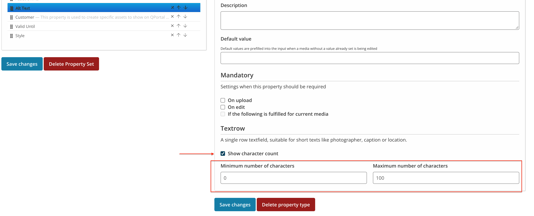
- Character count on text properties: When a text property has a minimum or maximum length, you now see a live character count (for example 75 / 150) while you type. To set it up, go to Admin → Properties → open the text property (e.g. Alt text) → turn on Show character count, and enter the minimum and maximum number of characters and Save.
- Saving only checks the properties you change: Older values that no longer match a property's current rules no longer stop you from saving. Only the properties you change are checked. Empty mandatory fields are still required.
AI Tagging
- Choose the AI tagging language per Image Analysis set: Each Image Analysis set now has a Language setting: QBank language, English or Swedish. AI tagging and AI suggestions for that set's properties are written in that language. Existing sets keep using the QBank language.
Note: Contact your Sales representative for more information.
Search & Filters
- Simpler condition builder: The condition builder in the new search filters now opens in Simple mode. Add a filter and apply it without choosing Any/All or groups first. Advanced mode is still there when you need to combine conditions. The new search filters are available on request: contact us to have them switched on.
API
- API v2: read folders and their property values: API v2 can now read a folder by ID, including its property values, and list its subfolders' property values in one request.
Bug Fixes
- Publishing - QBD-1483: Fixed an issue where "Publish new versions = No" was ignored
- API v2 - QBD-2105: Fixed an issue where API v2 ID filters failed when an operator was sent
- AI Tagging - QBD-2172: Fixed an issue where keywords from "New AI suggestions" weren't marked as AI-generated
- Publishing - QBD-2204: Fixed an issue where Cloudflare could keep serving outdated published files
- Social Media - QBD-2216: Fixed an issue where videos published to YouTube never arrived
- Consent Management - QBD-2749: Fixed an issue where the Consent overview in Administration failed to load
Best Regards,
Philip Daveby
Product Owner