
Optimizely CMS 12 – Image Tool Support
The QBank Connector for Optimizely CMS 12 now supports the new Image Tool.
Editors can now:
- Resize images directly from QBank
- Crop images before publishing
- Select output formats directly in the connector
This makes it easier to work with QMO (QBank Media Optimizer), our CDN solution that dynamically transforms images through commands in the published URL.
Optimizely CMS 13 Support
Support for Optimizely CMS 13 is coming in Week 23.
This update will provide compatibility with the latest version of Optimizely CMS.
Browser Connector Sidebar
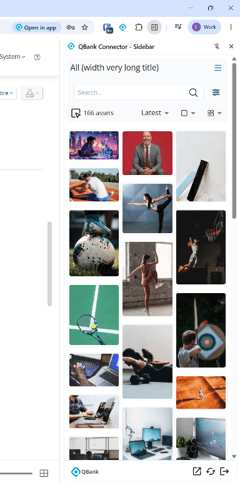
The Browser Connector for Chrome and Edge is being updated with a new Sidebar mode.
New Sidebar variant:
- Opens as a side panel in the browser
- Remains visible while working across tabs and pages
- Prevents the connector from closing during workflows
This creates a smoother and more efficient browsing experience.
Masonry View Mode
A new Masonry View is being introduced to the Browser Connector.
Images are displayed in a more visual and flexible layout:
- Assets are arranged in columns
- Images can have different heights
- Vertical gaps are automatically filled
This provides a more dynamic overview when browsing media collections.
Interested in the Browser Connector or Optimizely integrations?
Feel free to contact us if you’d like to learn more or see the updates in action.