
What are search weights and how are they ranked?
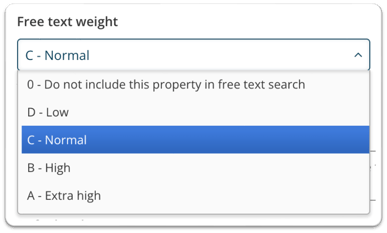
Search weights control how strongly a field influences search results. Each field type has a default weight: Titles are always weight B, miscellaneous metadata embedded in the media is always weight D, and properties default to weight C (set by the creator).
- A — Highest search weight
- B — High weight (fixed for Titles)
- C — Default weight for properties
- D — Low weight (fixed for miscellaneous embedded metadata)
- 0 — Excluded from search entirely
Can property weights be changed after creation?
The weight of properties cannot be changed after creation, as it is a processing-heavy operation that should only be performed when you are absolutely certain.
If you need to update property weights, please contact support with the details of the changes required and the support team will carry them out for you.