
Release Date 5.57: 11th of March 2026
Platform Improvements
Search on grouped assets
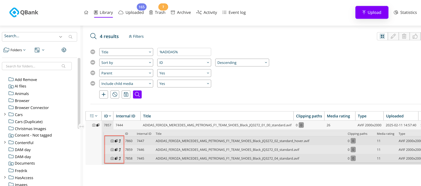
It is now possible to search for grouped assets, making it easier to locate and work with related content directly from search results.
Previously, child assets within groups were not included in search results. With this update, child assets are now included in List View when searching. You can also use Include children in your search to display these assets. Grouped assets are indicated with an arrow icon, making it easy to identify their relationship. 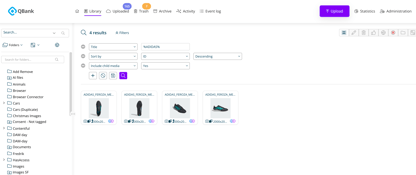
Consent
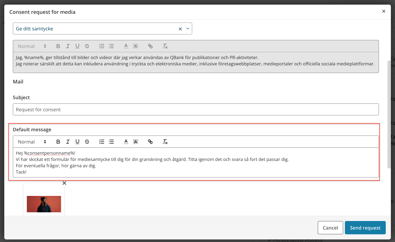
Edit consent email before sending
You can now edit the consent email before sending a consent request. This provides more flexibility and allows you to adjust messaging depending on the context.
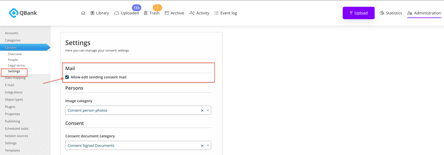
To enable this feature, go to Admin → Consent → Settings → Mail and activate Allow editing of consent email before sending.
Improved consent person handling
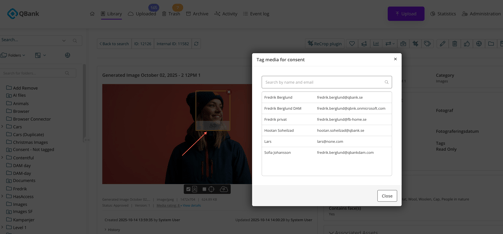
We have improved how consent persons are presented in the detail view, along with enhancements to the search functionality when tagging consent persons. This makes it easier to find and manage the correct individuals.
Connectors
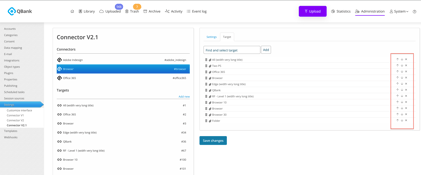
Custom order of targets in connectors
It is now possible to control the order in which targets are presented in both the Office 365 and Browser connectors, improving usability and workflow efficiency.
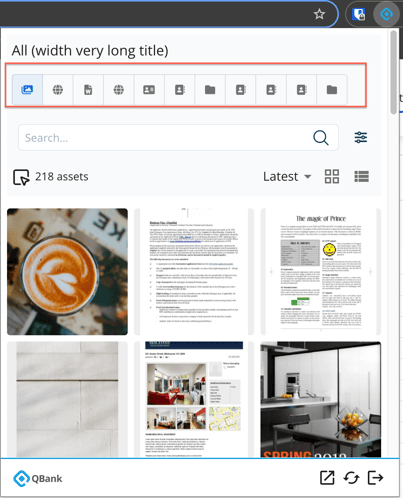
Interested in the Browser Connector?
If you’d like to learn more or see how it works, feel free to contact us and we’ll be happy to walk you through it.
Generic issues reported by customers fixed in this release
In addition to improvements, several reported issues have been resolved to enhance stability and usability:
-
QD-7203: Fixed an issue where video thumbnails rendered as black frames.
-
QD-7153: Fixed an issue to correctly display the latest consent status and ensure the correct status color is shown.
-
QD-7060: Fixed an issue where "My selection" was not working on folder moodboards.
-
QD-6742: Fixed an issue related to document template export to PDF format.
-
QD-6725: Improved handling of mandatory fields by highlighting the first missing required field.
-
QD-6684: Fixed an issue where media was incorrectly presented in folders when "search folders" was activated.
Fredrik Berglund
Head of Product